
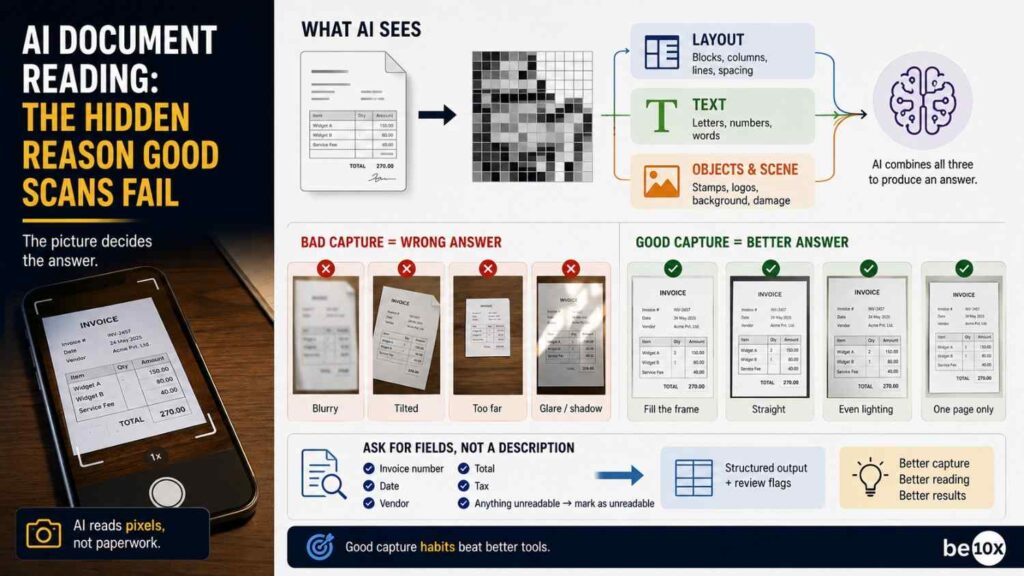
AI document reading has quietly become the most used feature nobody was taught to use. Somebody photographs an invoice, screenshots a dashboard, snaps a handwritten stock register, and pastes it into a chat window expecting the numbers to come out clean. Sometimes they do. When they do not, the blame lands on the tool, when the actual problem sat in the camera roll. AI document reading is far more sensitive to the picture than to the paperwork.
A page arrives as a picture, not as a document
A model does not open a file the way a spreadsheet program opens a file. It receives a grid of pixels, and nothing in that grid is labelled. No column header, no cell reference, no field name. Everything reported back is worked out from the arrangement of light and dark areas in front of it.
Three kinds of information get pulled out of that grid at once. Layout comes first, meaning the blocks, columns, table lines, and whitespace that signal how the page is organised. Text comes next, read out of the shapes inside those blocks. Objects and scene details come alongside, covering what is physically in the frame when the picture is a site photograph or a damaged parcel rather than paperwork. AI document reading fuses all three into one answer, so a confident reply can rest on a shaky reading of any one of them.
Layout is doing more work than people expect
A table usually survives the trip because AI document reading uses position on the page to decide what belongs to what. A number sitting under a column heading and to the right of a product name gets attached to both, and removing that visual structure removes the inference.
This is why a screenshot cropped mid-table produces confident nonsense. The figures stay legible, but the heading that gave them meaning is outside the frame, so they get assigned to whatever heading is visible. The output looks orderly and is wrong in a way that survives a quick glance.
Where the guessing starts
Text recognition degrades before it fails, which is what makes it dangerous. A slightly soft image does not return an error. It returns a five where the document said an S, a one where the document said a seven, a zero where the document said the letter O. Handwriting, carbon copies, faint dot-matrix print, and stamps overlapping figures push AI document reading further into inference and further from reading. Nothing in the reply distinguishes a character that was read from a character that was guessed.
Low contrast does the same damage as blur. A pale grey block on white, or dark text photographed in shadow, leaves less separation to work with, and less separation means more guessing.
Why a clear photograph beats a blurry scan
Here is the part that surprises people. The quality of the original document barely matters. The quality of the capture is close to everything, and AI document reading has no way of recovering detail that the camera never captured. A crisp phone photograph of a slightly creased form outperforms a blurry scan of a pristine one, because the pristine original is never seen, only the blurry evidence of it.
Resolution behaves in a way that is easy to miss. Images get resized before analysis, and the image guidance published by OpenAI notes that this resizing can obscure small details. A photograph taken from too far away holds the text in principle and loses it in practice once the page is scaled down, because fine print that was already small becomes a smudge. Filling the frame with the document is the highest-return habit available to anyone relying on AI document reading for paperwork.
The same rule governs written prompts. The post on what happens when AI is given bad instructions argues that output quality tracks input quality far more closely than tool choice, and an image is another input judged on the same terms.
The capture habits that fix most failures
Most bad results trace back to four fixable things. The document should fill the frame, with the camera parallel to the page rather than tilted. Lighting should be even, with the body of the person holding the phone out of the way so no shadow falls across the middle. One page belongs in one image, since two pages photographed together halve the effective resolution of each. Glare from a plastic sleeve or a glossy surface should be moved rather than tolerated, since a bright patch removes text entirely instead of degrading it.
There is a cost angle too, since AI document reading is not free to run at volume. An image is metered in tokens in much the same way text is, and higher detail settings consume more, which follows directly from the token accounting explained in Be10x’s piece on what every word actually costs. One sharp image at a sensible size beats four hopeful ones.
Ask for fields, not a description
The last habit concerns the request rather than the picture. Asking AI document reading what a page says invites a summary. Asking for named fields, invoice number, date, vendor, total, along with an instruction to mark anything unreadable rather than estimate it, turns AI document reading into an extraction step with a review flag built in. The unreadable marks are the point, because they show exactly where a person needs to look.
Habits like these are what separate a workflow that reads a hundred invoices correctly from one that quietly mangles a dozen, and they are picked up far faster by building than by reading. Learn AI document reading properly, along with the rest of the automation stack, can join the AI Career Accelerator Program at Be10X, where extraction is built hands-on rather than described.

